Besides manually inserting your own standard provisions, ‘borrowing clauses’ is another way of expanding the clause library. When reviewing imported contracts in Weagree (i.e. contracts that were created outside Weagree, by another party), users can flag provisions they believe may be useful for your organisation’s own use. Administrators can then decide whether or not to directly add these to the clause library, where they can fine-tuned as needed.
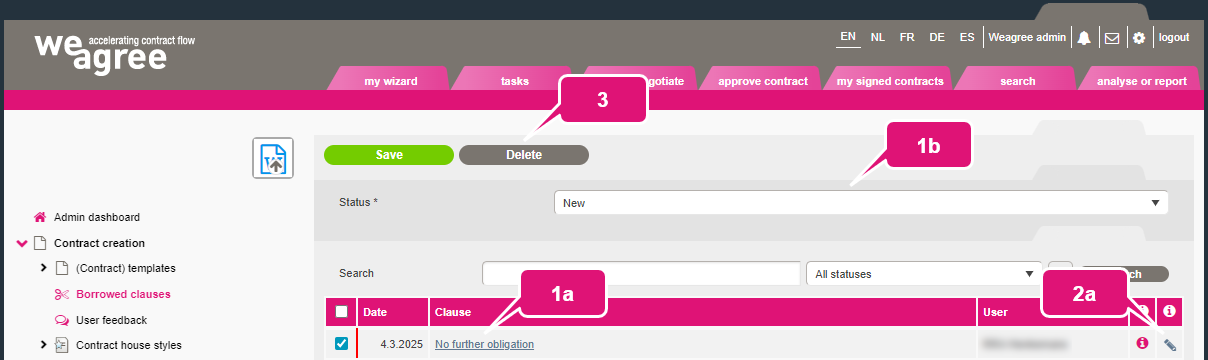
Proposed clauses are collected on the Administrator page, under Contract creation > Borrowed clauses.
1. To manually change the status of a proposed clause:
a. Click its description.
b. Select the desired status (New, Work in progress or Closed).
c. Click Save.
Note: the status will automatically change to Work in progress when the administrator initiates a review, and automatically change to Closed when the review is completed in one of the two ways described below.
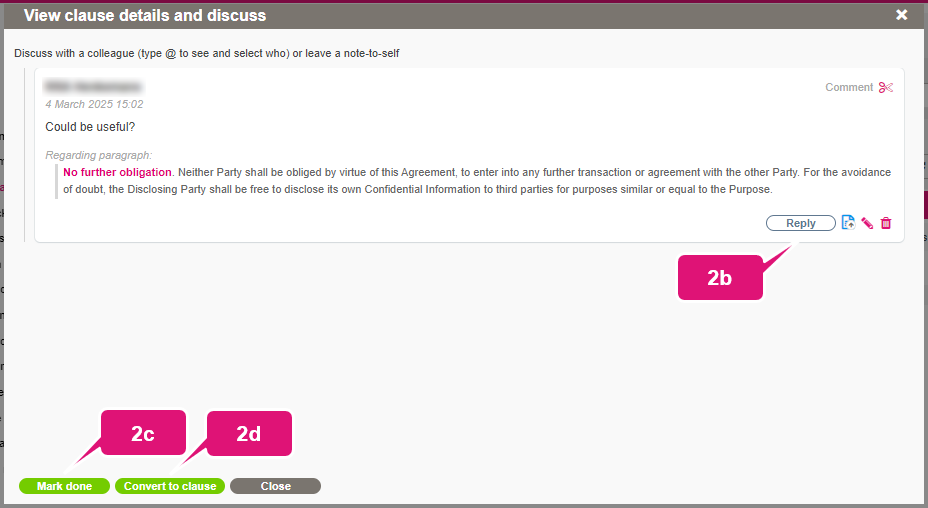
2. To review a clause:
a. Click its pen icon.
b. Optionally, click Reply to discuss the proposal.
c. If the proposal should be rejected, or no further action is otherwise required, click Mark done.
d. If the clause proposal should be accepted, click Convert to clause.
Note: converting a clause will immediately add it to the clause library and open the new global contract clause in the Template Creation Tool. Both its contents and its general details as shown in the clause library may be edited from that page. For further information on the clause library, click here.
3. Click Delete to remove any selected proposals from the list.
Note: deleting proposals will not delete any additions to the clause library.