


The Weagree Wizard distinguishes various task statuses on the tasks Kanban and list view. By default, it diffentiates between (from left to right on the Kanban):
- Backlog
- Unscheduled (on hold)
- In progress
- Do now
- Awaiting input
- Completed
The available statuses, their details and their order can be freely customised on the Administrator page, under Tasks management > Task statuses.
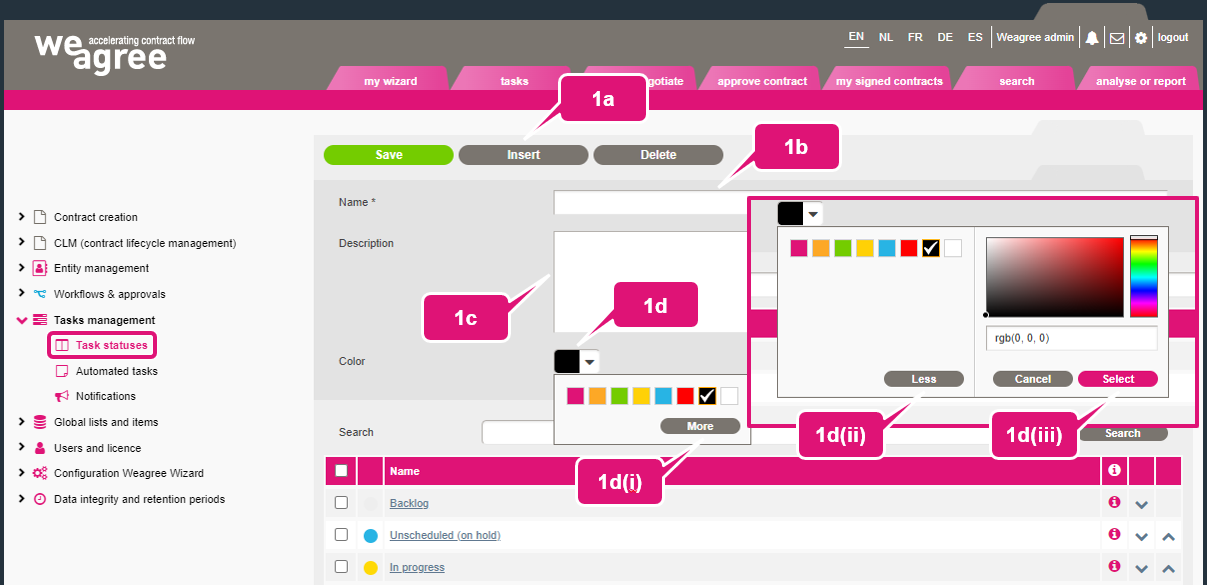
1. To insert a new status:
a. Click Insert.
b. Insert a name that is sufficiently self-explanatory for users.
c. Optionally, insert a clarifying description (at the moment, this will only inform administrators accessing this page).
d. Select a colour from the colour picker. Several default options will be shown, but you can also choose a custom colour:
(i) Click More to show the RGB picker.
(ii) Click Less to close the RGB picker again.
(iii) Click Select to choose your custom colour.
2. Click a task status’ name to edit its details. Click Save when finished.
3. Hover the mouse over a task status’ information icon to see its description (if any).
4. The order in which the task statuses are listed can be changed by clicking the up and down arrows.
5. Click Delete to delete any selected task status.
WARNING: be careful with deletions. Deleting a status can have unintended side-effects on automated tasks (and manually created tasks, of course) that still have that status. Regardless, NEVER delete the Completed status, as the automated system depends on it.

