


The Weagree Wizard distinguishes a number of key functionalities. These cover the main aspects of the application and can therefore be used to either open or close off large parts of the Weagree Wizard, as well as certain special features. Activating (or deactivating) them is very easily done on the Administrator page, via the Key functionalities subitem of Configuration Weagree Wizard:
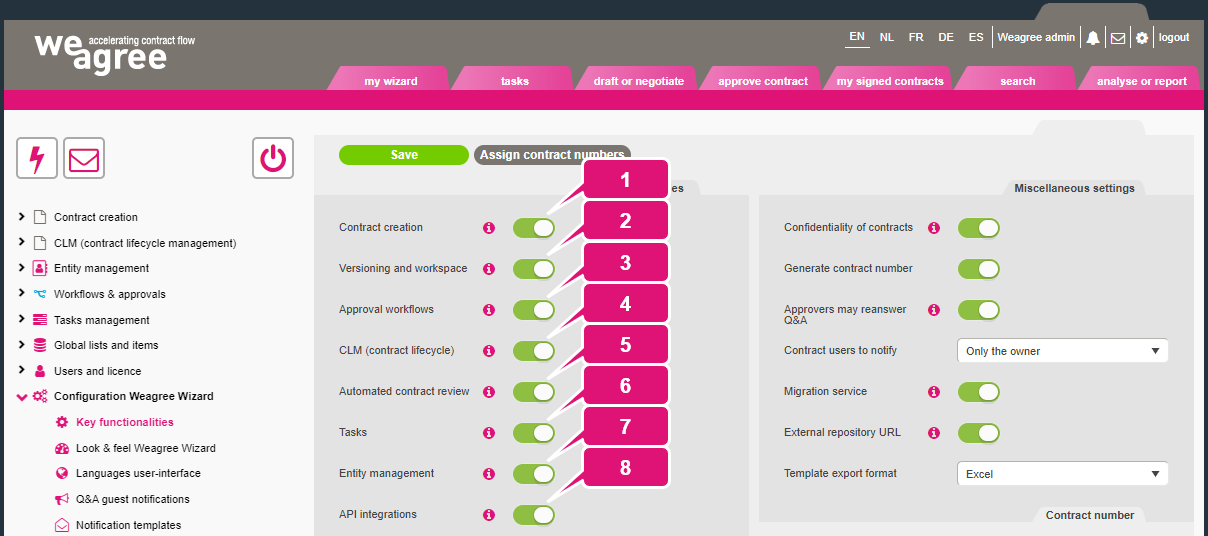
Note: all functionalities can be wholly or partly enabled or disabled per user role, API integrations excepted (although associated rights may still be enabled or disabled per user role, for instance the right to customise a folder path for storage in SharePoint or the right to start e-signing). Disabling functionalities on this page is therefore recommended only when they should not be available to any user.
1. Contract creation
This enables or disables the Draft or negotiate page (and the separate New contract page, if that was enabled), as well as the Contract creation section of the Administrator page. When disabled, users will not be able to create any new contracts and administrators will not be able to create, edit or organise contract automation templates, the clause library, or anything to do with the contract house styles. It is recommended to always leave this on, unless your organisation wishes to use the Weagree Wizard exclusively for managing imported or manually inserted contracts, rather than for contract creation.
When enabled, the Template export format setting will also appear on the Miscellaneous settings subtab on the right. From the Template Creation Tool, administrators can export an entire template (including global library elements) either in Excel or JSON format.
2. Versioning and workspace
This functionality determines whether users (with appropriate authorisations) can access a contract’s repository for downloading, uploading and comparing various documents.
3. Approval workflows
This enables or disables the Approve contract page and the approval workflow functionality as a whole (including the Workflows & approvals section of the Administrator page). Activating this feature presupposes that contract creation is also active.
When enabled, the Approvers may reanswer Q&A setting will also appear on the Miscellaneous settings subtab on the right. It permits approvers to personally edit the questionnaires of submitted contracts; if disabled, a approver has to reject it and ask the contract’s creator to make any necessary changes before resubmitting the contract.
4. CLM (contract lifecycle)
This enables or disables the My signed contracts page, as well as the CLM (contract lifecycle management) section of the Administrator page. When switched off, it will no longer be possible to move contracts from Draft or negotiate to Weagree’s CLM, either. Always leave this on if there remain any contracts that need to be managed.
When enabled, the Migration service setting will also appear on the Miscellaneous settings subtab on the right. Administrators can use this to import existing CLM and CRM data in bulk. Switching this off after running an import will not remove or disable access to any contracts or parties that have been migrated into the Weagree Wizard.
5. Automated contract review
The Weagree Wizard has in-built optical character recognition (OCR) and integration with OpenAI’s Enterprise API, for analysing text through ChatGPT. These can be used to automatically convert an imported non-editable document to text, extract data from it and perform a risk assessment. This functionality can be used with both the contract creation and the CLM functionalities.
6. Tasks
This enables or disables the Tasks page and the tasks functionality as a whole (including the Tasks management sectino of the Administrator page). Although it is intended to complement contraction creation and the CLM by automatically generating tasks, it is possible to use this as a standalone feature, as users can create their own tasks, not directly connected to any one contract.
7. Entity management
Enabling this will grant users, depending on their authorisations, access to Weagree’s party database (CRM) and full entity management (corporate housekeeping). Otherwise, party data will always have to be manually entered for each contract and the data will not be visible for any users without access to those specific contracts.
8. API integrations
All integrated services can be simultaneously enabled or disabled with this switch, if need be. It is recommended that any configured integrations are only disabled on an individual basis via the API integrations subsection of Configuration Weagree Wizard, however. Note that this switch does not affect their settings, only whether they are actually activated and available or not.
Note: the other elements of the Miscellaneous settings subtab and other subtabs that may appear below it go beyond the scope of this article and are therefore explained elsewhere in this knowledge base.
