


Under very specific conditions, schedules and annexes may start numbering at 0 instead of 1.
This is caused by the placement of the first [annex] tag within the template relative to the first building block or clause with a numbered Level styling (Level 1, Level 2, etc.). The tag must be placed inside or after the first such building block or clause, otherwise it will not start numbering at 1. It is a side-effect of how automatic numbering in Microsoft Word works.
If possible, consider referencing the schedule or annex elsewhere in your template. If that is not an option and it must be referenced in the recitals, for example, this can be resolved in the following manner:
1. Open the schedule or annex and create a cross-reference to its title. When creating the cross-reference, first click Options and then select Inserts the paragraph number from the cross-referred paragraph as that number appears in the document. This changes a modifier in the cross-reference tag. It will have the following format, where the “NH” modifier is key: [reference.Title.NH.12345]
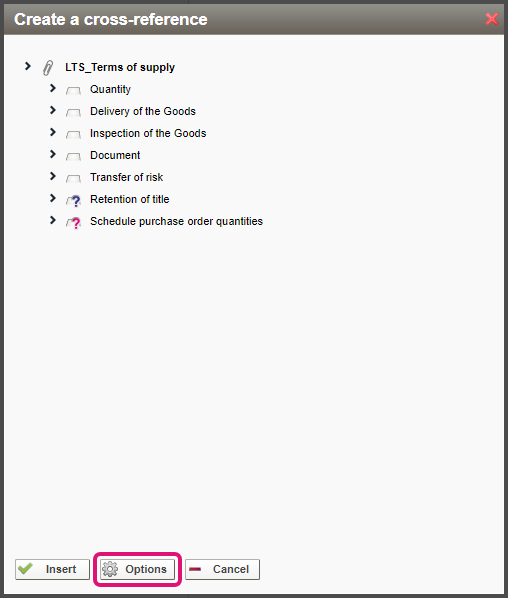
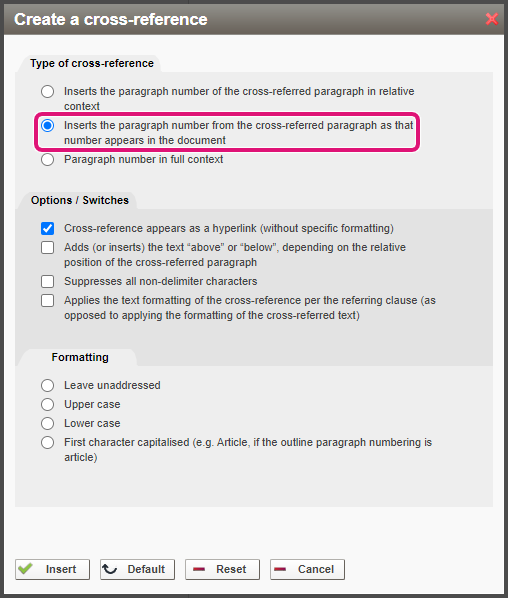
2. Cut and paste the cross-reference (you will not need it in the schedule or annex itself) into the applicable template clause, replacing the [annex] tag there.
3. The cross-reference does not itself trigger the inclusion of the schedule or annex; only the actual [annex] tag does this. Therefore, if this schedule or annex is not referenced anywhere else in the template, you will have to add an [annex] tag someplace else. You may choose to hide it in a separate, otherwise empty clause with appropriate formatting (for instructions, click here).
Alternatively, using the HTML editor (for more information, click here), you can insert the tag using the following format at the end of the same clause as the cross-reference:
<span style=”font-size: 0pt; color: white;”>[annex.Name]</span>
Note that this will render the link to the schedule or annex effectively invisible not just in the generated document, but also in the Template Creation Tool. Finding it again may therefore require use of the Template Creation Tool’s search functionality.
