


The Weagree Wizard supports full customisation of data retention periods, enabling compliance with general legal requirements, privacy regulations (such as the GDPR and CCPA), internal policies and information security standards. Different retention periods may be defined for different types of data, allowing you to precisely tailor your portal to retain information in accordance with your obligations and needs. When it comes to contracts, it is also possible to differentiate by type, and even to configure data retention on a contract-by-contract basis.
At the end of an applicable retention period, the data are automatically moved to the recycle bin. After remaining in the recycle bin for a preset number of days, the system will permanently delete the data (until then, administrators may either recover or manually delete them).
Note: the system checks once per day, at midnight CET, whether any retention period has expired.
TABLE OF CONTENTS
A. Enabling data retention
B. Retention periods
C. Recycle bin
D. Anonymise contracts
A. ENABLING DATA RETENTION
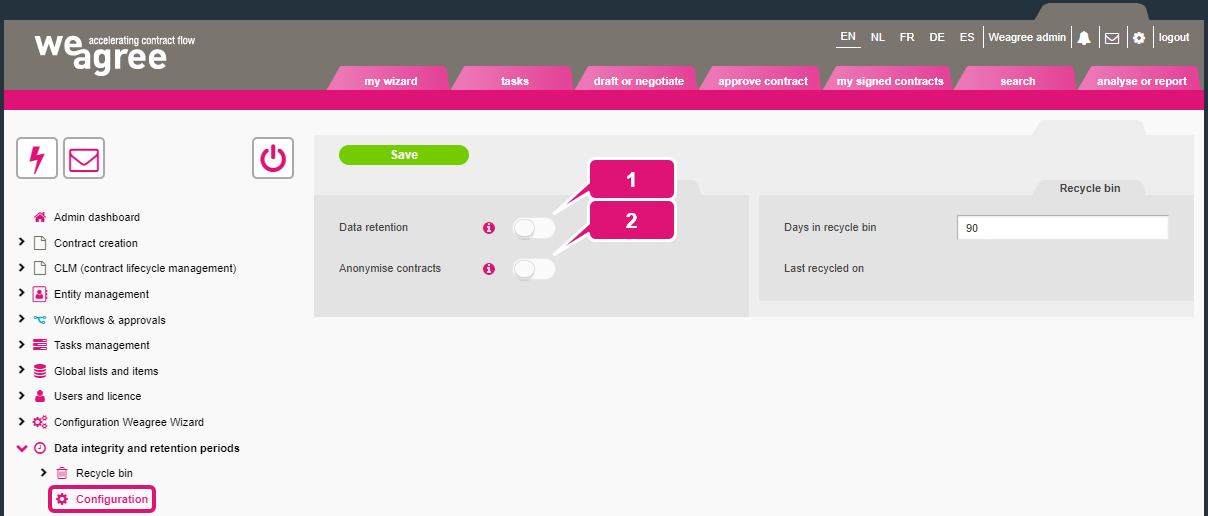
On the Administrator page, navigate to Data integrity and retention periods > Configuration to enable data retention.
1. Data retention
This is the primary functionality. When enabled, the subtab Retention periods appears for configuring which data will be subject to the Weagree Wizard’s data retention automation and which periods will apply to them.
2. Anonymise contracts
The secondary data retention functionality, enabling this automate the removal of users from contract entries. It has the same effect as deleting a user: the user’s contract entries will remain, but will no longer be assigned to that user. The contract itself will not be affected. The purpose of contract anonymisation is therefore to delete personally identifiable information when legally required or no longer needed. When enabled, the subtab Anonymise contracts will appear for configuring when contracts will be anonymised.
Note: do not forget to click Save after making any changes on any of the subtabs detailed below.
B. RETENTION PERIODS
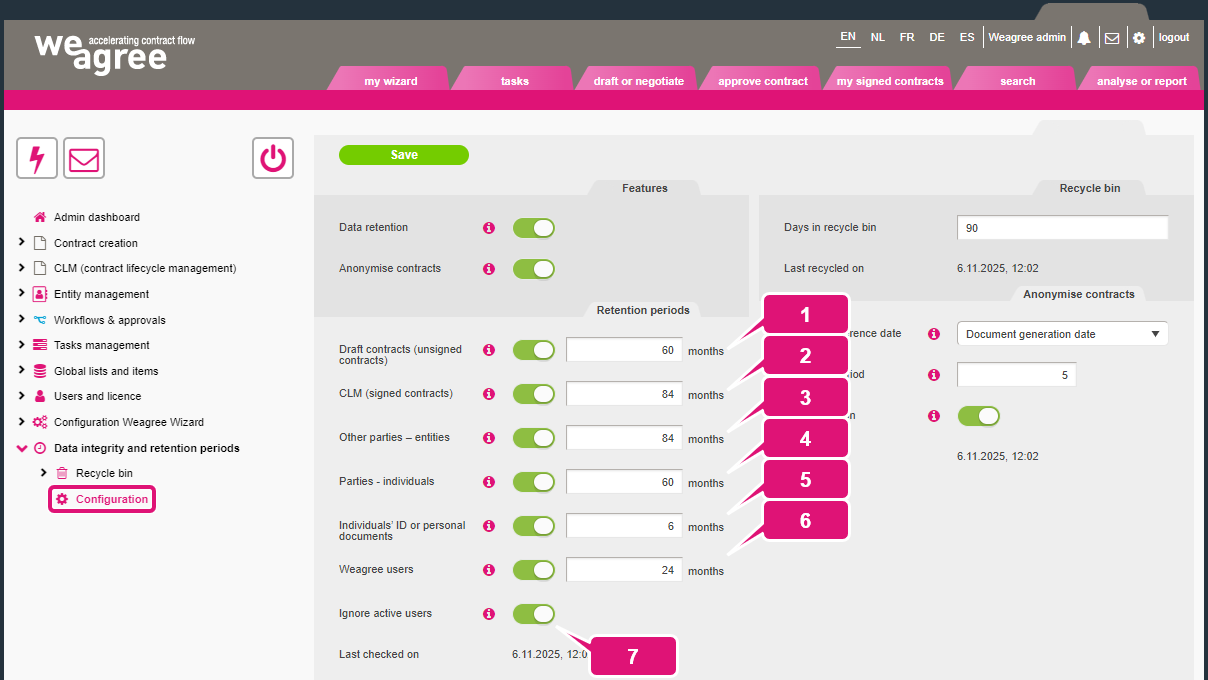
The Retention periods subtab distinguishes the following types of data. For each type, a retention period may be defined in months. Every 24 hours, the system checks whether the retention period for any piece of data in your Weagree database has expired.
Note: the Weagree Wizard’s data retention automation will delete files stored in Weagree, but not files on external systems such as SharePoint.
1. Draft contracts (unsigned contracts)
Contract entries on the Draft or negotiate page. This will delete the contract entries themselves, the related communications (as they appear within the contract entry) and all files in the repository. The data retention period will begin at the moment of the contract entry’s creation (when the user starts a questionnaire). By default, the period ends after 60 months (five years).
2. CLM (signed contracts)
Contracts entries on the My signed contracts page. This will delete the contract entries themselves, the related communications (as they appear within the contract entry) and all files in the repository. The data retention period will begin at the moment a contract has been marked as terminated or expired. By default, the retention period for signed contracts ends after 84 months (seven years). However, it is possible to deviate from this per contract sheet (for more information, see section B of General contract sheet configuration), or even per individual contract.
3. Other parties – entities
Entities in the ‘other party’ (CRM) database, such as suppliers, customers or partners. This will delete the entities from the party database and all their files in the extended entity management (corporate housekeeping) database. The data retention period will begin when the entity is no longer party to any active contract entry in your Weagree portal. By default, the period ends after 84 months (seven years).
4. Parties – individuals
Natural persons in the party database, such as managing directors, representatives or regular counterparties. This will delete all their data and files, such as ID copies. The data retention period will begin when the individual is no longer designated as having a position with any entity in the database. If someone is not associated with another entity at all, it will therefore begin immediately upon their addition to the party database. By default, the period ends after 60 months (five years).
5. Individuals’ ID or personal documents
Files uploaded to the corporate housekeeping pages of individuals. This will delete just the files, not the other data associated with these persons. The data retention period will begin when the individual is no longer designated as having a position with any entity in the database, or when a document expires (whichever comes first). This operates independently of the Parties – individuals setting. By default, the period ends after 6 months.
6. Weagree users
This will delete user accounts from your Weagree portal, including any reference to them. Contract entries associated with such user accounts will not be affected as such, although they will no longer be assigned to any user and may therefore need an administrator or end-user with sufficient access rights to reassign them. The data retention period will begin when the user account is deactivated or expires. By default, the period ends after 24 months (two years).
7. Ignore active users
This setting prevents the automated removal of user details from contracts if the persons in question are still active Weagree users.
C. RECYCLE BIN
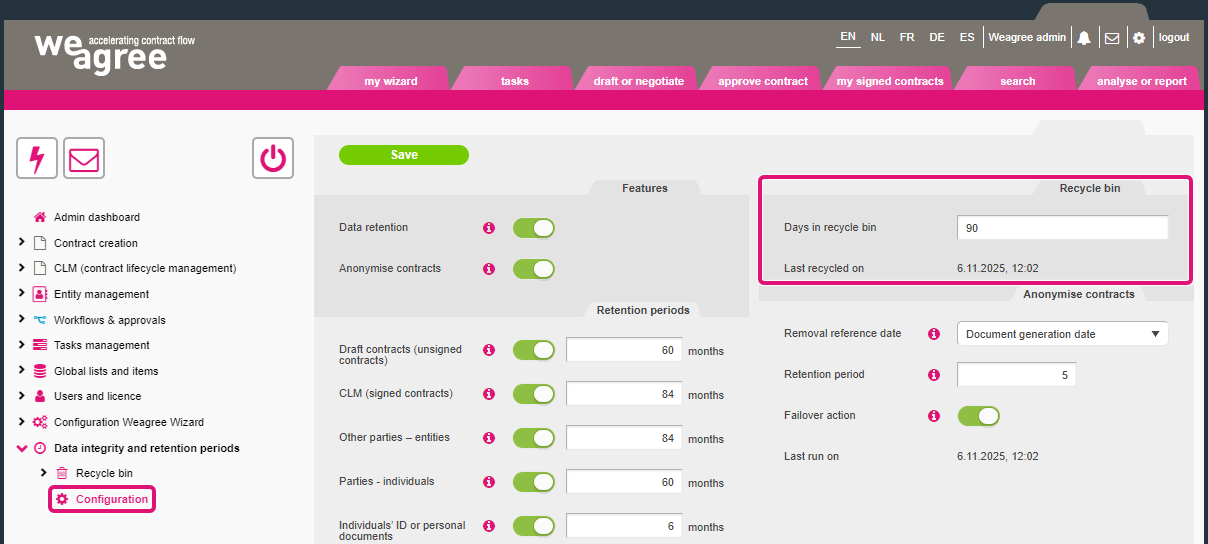
Whether or not the data retention functionality is enabled, any type of data as listed on the Retention periods subtab that is deleted will be moved to the recycle bin (with the exception of individual files, which are immediately and permanently deleted). Every 24 hours, a check is performed against the value in the Days in recycle bin field to determine whether any items in the recycle bin must be permanently deleted. By default, items will be kept for 90 days.
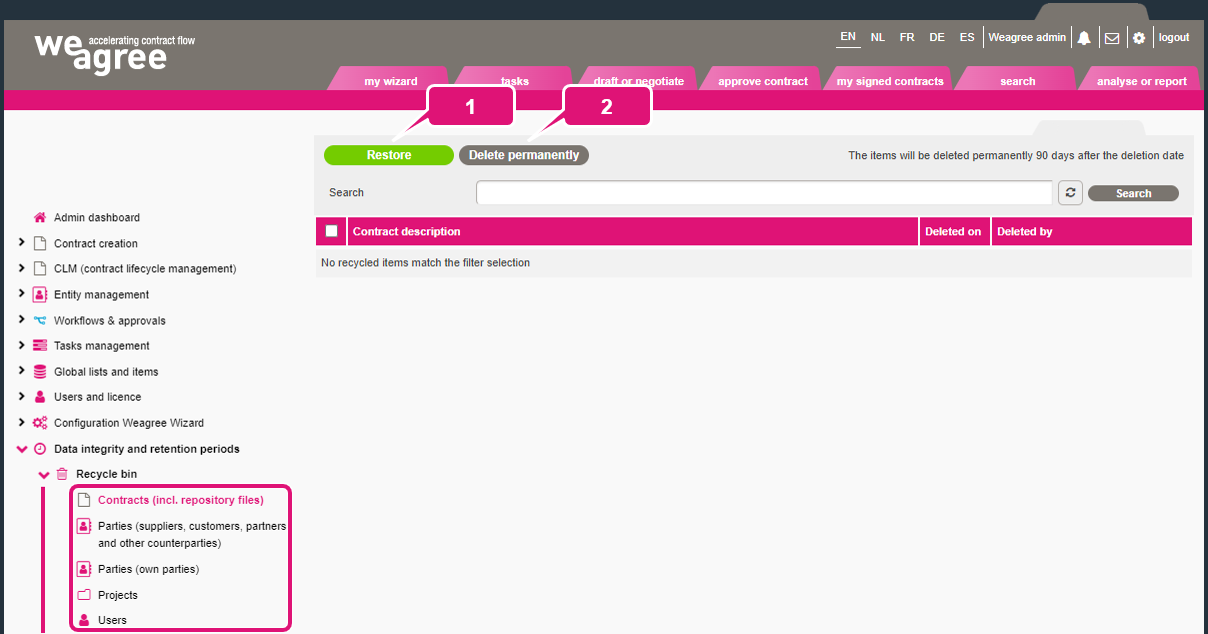
Before expiry of this term, the Recycle bin page also allows you to 1. restore any deleted item, or 2. manually delete it.
D. ANONYMISE CONTRACTS
The settings on the Anonymise contracts subtab determine the criteria for anonymisation of contract entries.
1. Removal reference date
The option selected here represents the start of this specialised retention period. There are four options:
a. Entry creation date
b. Approval date
c. Document generation date
d. Entry modification date
Note: apart from the entry creation date (option a), which cannot change, these dates may be renewed for a single contract entry. Subsequent approvals, generated documents and entry modifications (for example, if a contract field’s value is changed) will reset the retention period.
2. Retention period
This value is the number of years from the reference date until anonymisation.
3. Failover action
It may be that the selected reference date will never apply to certain contract entries. For example, if your reference date is the last approval date, but approval workflows were only implemented after your portal had already been in use for some time (or were never implemented for some templates). Enabling the failover action will nevertheless apply anonymisation if there is a document generation date for that particular contract entry. It is recommended that you always leave this on.

